A semester of exercises for Seeing Machines at ITP, a class teaching various techniques and solutions for tracking and sensing people or objects in space, all written in C++ with OpenFrameworks pre gen-AI. I studied computer science and have spent my career on the web, so dropping into C++ and a creative coding framework meant relearning a lot of things I thought I knew.
These are in the order I built them, which is also roughly the order of how much they could see.
Experiment #1: Karina's Game of Life
First, let's talk about Conway's Game of Life!
It's a cellular automaton that mathematician John Conway came up with in 1970. It's also a zero-player game. You set up a grid of cells, hit go, and then never touch it again.
The whole ruleset is four lines:
- A live cell with fewer than 2 live neighbors dies, as if from loneliness
- A live cell with 2 or 3 live neighbors stays alive
- A live cell with more than 3 live neighbors dies, as if from overcrowding
- A dead cell with exactly 3 live neighbors comes to life
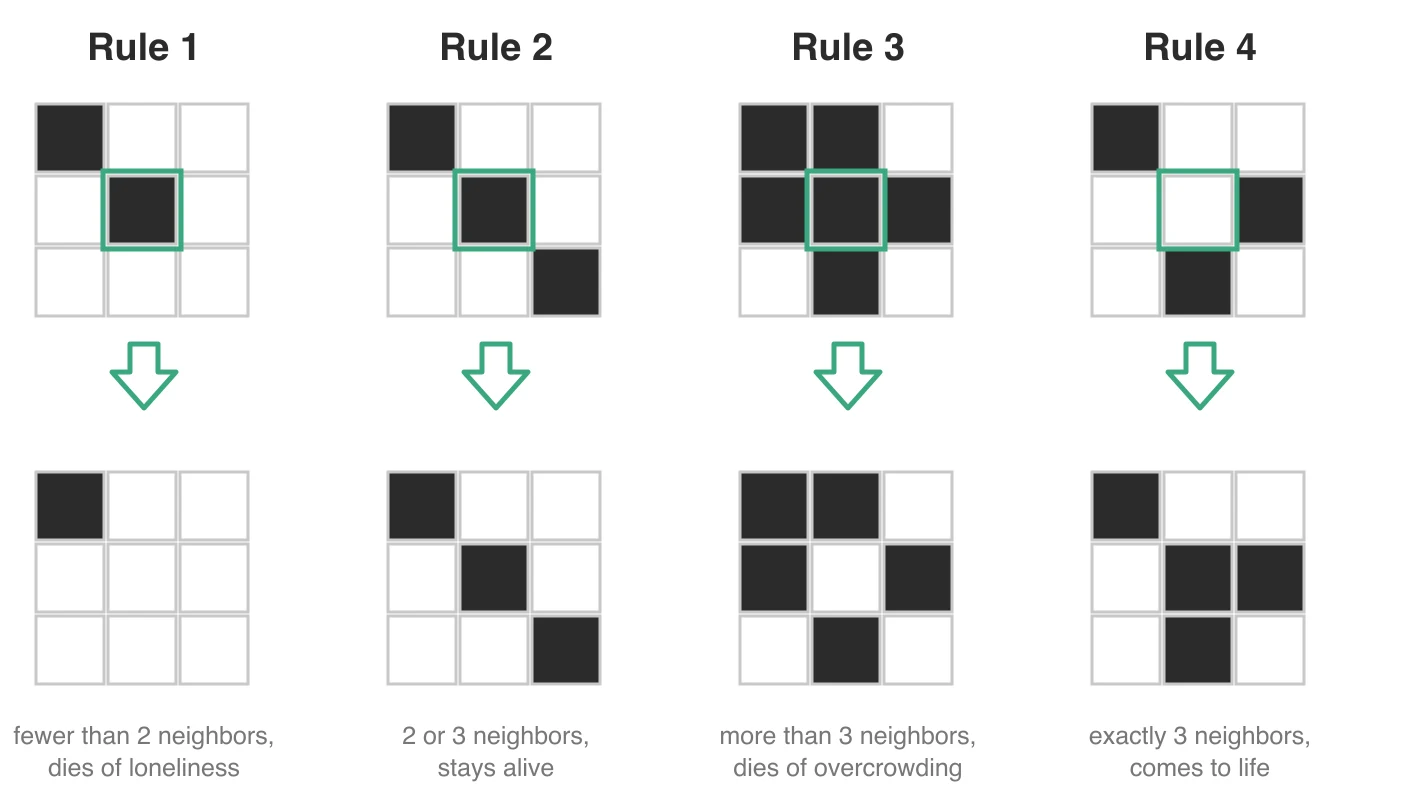
That's it! And out of those four lines you get gliders that walk across the screen, oscillators that blink forever, and little clumps that just sit there. It's also Turing complete, which sounds made up until someone builds a working computer inside it. The first experiment was to simply implement this simple rule set in OpenFrameworks.
But of course, let's to go above and beyond and add some little controls too!
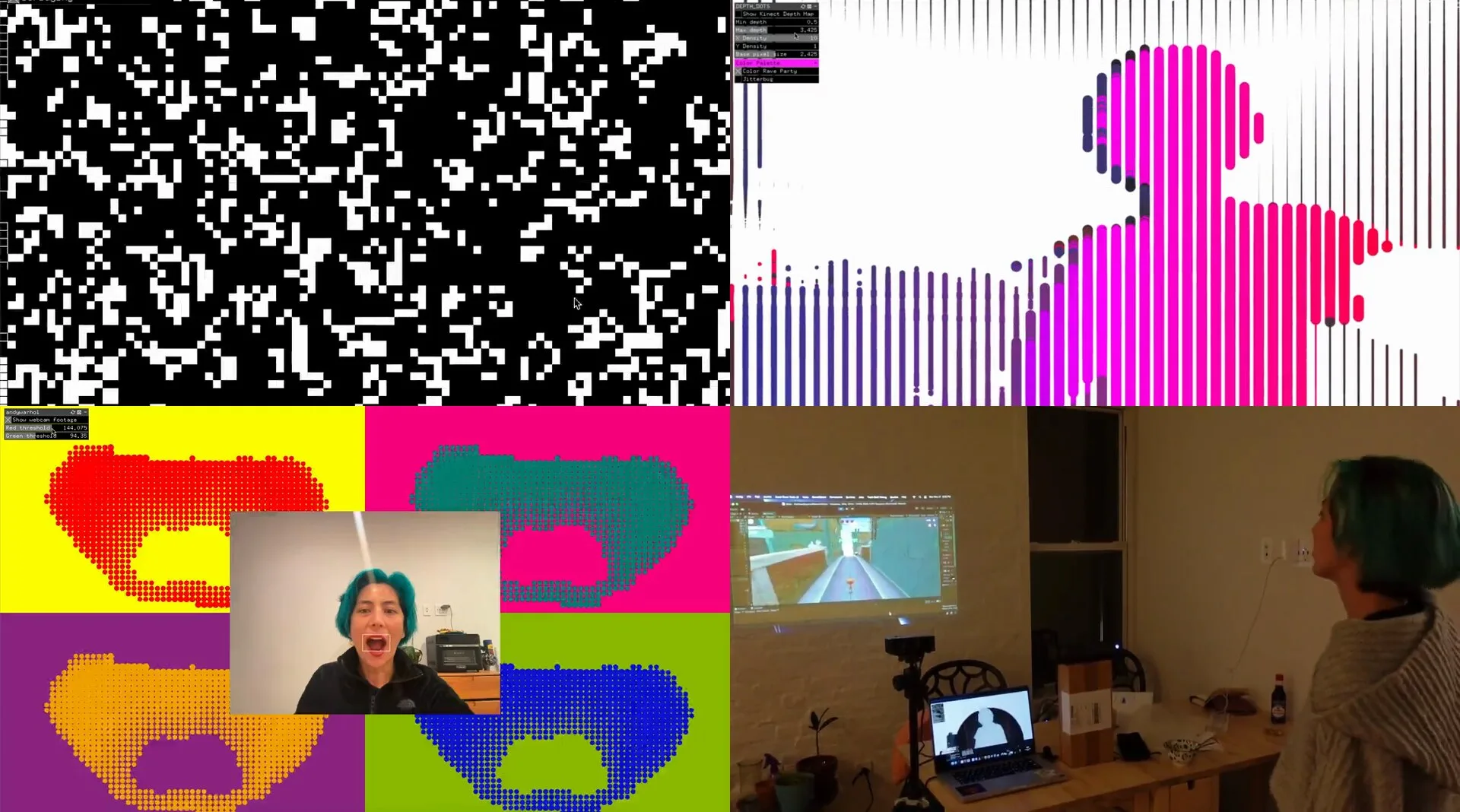
The "little controls" are an ofxGui panel: play/pause, a reset button, and sliders for pixel size and speed. Pixel size is the fun one! It changes the resolution of the board itself instead of just zooming in. Same rules, completely different grain.
Then came the part that makes it a Seeing Machines project instead of a computer science exercise!
Someone on Twitter/X made a suggestion:
 Fudmottin@FudmottinNow convert the image to monochrome and use it as the initial state for Life.
Ask and you shall receive!
So I added webcam functionality to take a picture of yourself as the seed for Conway's Game of Life.
Instead of seeding the board randomly, it grabs a frame from an ofVideoGrabber and thresholds it. Every pixel brighter than 140 becomes a live cell. Everything darker becomes a dead one. Then Conway takes over, and your face is the initial condition!
Experiment #2: Kinect Depth Dots
This one started as pure messing around with depth sensing data from a Kinect V2. Pretty basic stuff to start, but I figured gaining familiarity would give me inspiration for cooler projects later.
The Kinect is a depth camera Microsoft built as an Xbox controller, so you could play games by flailing around your living room instead of holding anything. It came out in the same generation of gaming hardware as the Nintendo Wii controller. When I was in undergrad as a human-computer interaction major, we LOVED these things; the technology is so neat and we would just play around and try to find applications for it. It was, after all, a very novel and interesting way to interact with a computer!
That said, it flopped as a controller! Turns out, gamers don't necessarily want to get up and flap their arms around or dance to play, they'd rather sit and focus with a normal controller in hand. Artists loved it though because it opened up a whole new world for interactive installations. Suddenly there was a real depth sensor on a lot of desks for about $100.
So what makes it different from a webcam? It isn't measuring color or brightness. It's measuring distance.
The original Kinect projected a fixed speckle pattern of infrared dots across the room. It watched how that grid got distorted by whatever it landed on, then triangulated depth from the distortion. The V2 I used does it differently. It floods the scene with modulated infrared light and measures the phase shift of the light bouncing back, pixel by pixel. Light that took longer to get home came from something further away. That's called time-of-flight, and what it's measuring is reflection, not refraction.
Either way, what comes out is an image where every pixel is a distance in meters instead of a color. Your room lighting doesn't matter at all, because the sensor brought its own.
Concretely, here's what you actually get to work with:
// A depth frame is 512 x 424 readings, one per pixel
depthPixels = kinect.getDepthPixels();

// Ask for the distance at any point, in meters
float dist = kinect.getDistanceAt(x, y);

// (256, 212) -> 1.284   me, standing about four feet back
// (256,  40) -> 2.900   the wall behind me
// ( 10,  10) -> 0.000   no return at all

// Or read the raw values straight off the texture, in millimeters
const ofFloatPixels& rawDepthPix = kinect.getRawDepthPixels();
int depthAtPoint = rawDepthPix.getColor(x, y).r;   // 1284
That 0.000 is the part that bites you. Anything too close, too far, too shiny, or hidden behind something else just comes back as nothing, so a good chunk of every frame is holes. That's what the min and max depth sliders are for: throw away everything outside the range you actually care about, and only draw the rest.
This sketch samples that depth image on a grid and draws one dot per sample. Distance drives both the size and the color. Lean in and your dots swell!
The ofxGui panel exposes min and max depth, separate X and Y density, and a base pixel size. The densities change the whole character of it. Even at X Density 10, dropping Y Density to 1 stretches every dot into a tall streak, and a cloud of dots becomes a barcode of a person. There are also two toggles, Color Rave Party and Jitterbug, which do exactly what you'd expect!
Experiment #3: Warhol Lip Popart
Playing with the OpenCV addon in OpenFrameworks (C++) using Haar Cascades.
Haar cascades is a machine learning object detection algorithm used to identify specific objects, such as faces or eyes, in digital images and video to find the viewer's mouth. Typically it does that by being trained on borders between light and dark in small rectangular patterns. They're very accessible within OpenCV, so we could use the webcam to make Andy Warhol-inspired popart. Fun stuff!
This one uses ofxCv and runs two Haar cascades in sequence. First haarcascade_frontalface_default.xml finds the biggest face in frame. Then, instead of hunting for a mouth across the whole image, it crops to the bottom 35% of that face rectangle and runs haarcascade_mcs_mouth.xml only inside it. Narrowing the search that way is both faster and much less prone to finding a "mouth" in someone's hairline.
The caveat for all of this is that Haar cascades generally are single-person smile strength detectors and are not robust against rotation. They are trained on upright, front-facing examples, so tilt your head and the whole thing falls apart.
Experiment #4: Kinect to Unity over OSC
This got me feeling like 2011-era gaming up in my apartment...just with fifteen years of hindsight and much better libraries.
I used the Kinect to get depth data, detecting blobs with OpenCV, deciphering movements, and then sending data with OSC to the Endless Runner example from the Unity Asset store.
This is the one where everything I've done thus far gets stacked! The Kinect provides depth. ofxCv's ContourFinder pulls blobs out of the depth image. An ofxCv::RectTracker gives each blob a stable label across frames, so a person stays the same person. The screen is split into lanes, and the center of your blob decides which lane you're in.
Jumping and sliding come from how long your bounding box stays past a threshold. There's a debounce interval too, so one jump doesn't fire twenty messages.
All of it goes out over OSC to localhost:1337, where Unity's Endless Runner sample is listening.
Wait, OSC? What's that?
Open Sound Control came out of CNMAT at Berkeley in the late 90s as a successor to MIDI. It's quietly become the way creative tools talk to each other. A message is just a URL-shaped address plus some typed arguments, fired over UDP. It's fast, it doesn't care what language either side is written in, and nobody has to wait for a reply.
The whole vocabulary I ended up sending is five messages:
/player/move   -1        # step one lane left
/player/move    1        # step one lane right
/player/jump             # no args, you jumped
/player/slide            # no args, you ducked
/object/move   12 340 190 16711680   # label, x, y, color as hex
/object/delete 12        # that blob is gone, stop tracking it
/player/* drives the runner. /object/* is the general half, broadcasting every tracked blob so Unity can draw whatever it wants for each one. Two channels out of one pipeline! One is opinionated about a game, and one just reports what it sees.
The settings panel ended up with four groups: Kinect clipping, contour finder area and persistence, player movement thresholds, and toggles for which messages to send. Most of the work in a project like this is tuning, not writing!